NSE5_FMG-6.4 Fortinet NSE 5 - FortiManager 6.4

Loading demo links...

Showing 1–3 of 10 questions

Question 1 (Main Questions Pool A)

Refer to the exhibit.
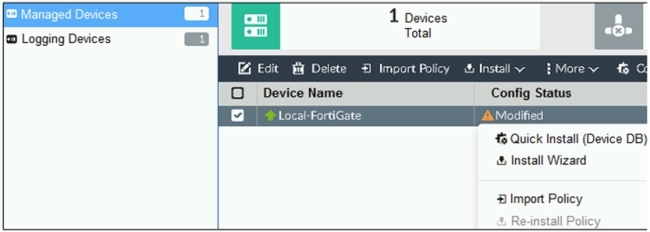
Graphical user interface, text, application, email Description automatically generated

You are using the Quick Install option to install configuration changes on the managed FortiGate.

Which two statements correctly describe the result? (Choose two.)

Select all that apply, then click Submit answer.

  • It will not create a new revision in the revision history

  • It installs device-level changes to FortiGate without launching the Install Wizard

  • It cannot be canceled once initiated and changes will be installed on the managed device

  • It provides the option to preview configuration changes prior to installing them
Question 2 (Main Questions Pool B)

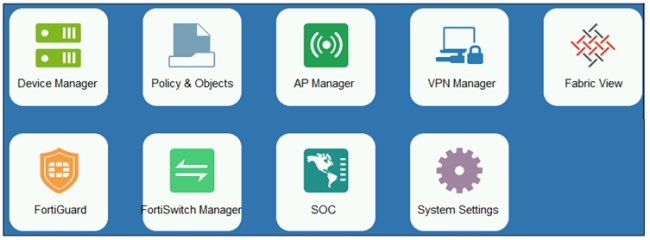
Refer to the exhibit.

An administrator logs into the FortiManager GUI and sees the panes shown in the exhibit.

Which two reasons can explain why the FortiAnalyzer feature panes do not appear? (Choose two.)

Select all that apply, then click Submit answer.

  • The administrator logged in using the unsecure protocol HTTP, so the view is restricted.

  • The administrator profile does not have full access privileges like the Super_User profile.

  • The administrator IP address is not a part of the trusted hosts configured on FortiManager interfaces.

  • FortiAnalyzer features are not enabled on FortiManager.

Question 3 (Main Questions Pool C)

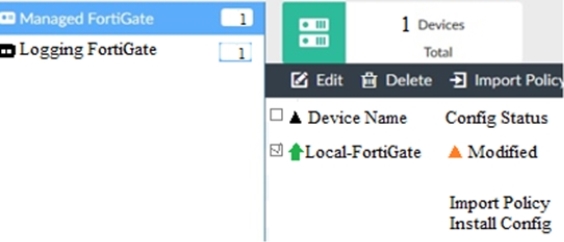
View the following exhibit.

When using Install Config option to install configuration changes to managed FortiGate, which of the following statements are true? (Choose two.)

Select all that apply, then click Submit answer.

  • Once initiated, the install process cannot be canceled and changes will be installed on the managed device

  • Will not create new revision in the revision history

  • Installs device-level changes to FortiGate without launching the Install Wizard

  • Provides the option to preview configuration changes prior to installing them