1Y0-403 Citrix Virtual Apps and Desktops 7 AssessmentDesign and Advanced Configurations

Loading demo links...

Showing 4–6 of 10 questions

Question 4

Scenario: A Citrix Architect needs to manage the disaster recovery (DR) process for a Citrix Virtual Apps and Desktops environment. The environment currently consists of an active data center typically accessed by users, and a DR data center used in the event that a disaster impacts the primary data center. Each data center hosts a separate Citrix Virtual Apps and Desktops Site. The overall environment has been designed to actively replicate user data and application data from the primary data center to the DR data center using Microsoft Distributed File System Replication (DFSR). Management has made it a priority to minimize the loss of data when failing over between data centers.

The primary data center suffers an outage that affects multiple components. As a result, management decides to fail over to the DR data center. The architect has blocked access to the primary data center to prevent new attempts to connect to its Citrix Virtual Apps and Desktops Site.

Which two actions must the architect perform to meet company priorities before enabling access to the DR data center? (Choose two.)

Select all that apply, then click Submit answer.

  • Drain existing sessions from the primary data center.

  • Complete data replication from the primary data center to the DR data center.

  • Replicate the Site's SQL database backups to the DR data center.

  • Evaluate the condition of the Citrix Virtual Apps and Desktops environment in the primary data center.

  • Transport backup data repositories to the DR data center.
Question 5

Scenario: A Citrix Architect is designing a new Citrix Virtual Apps and Desktops environment. During the project kickoff meeting, the organization stated the following business priorities:

“Overall, we want a robust solution that ensures users’ ability to access resources at any time, even if the primary data center experiences an outage. Since employees will need to access resources from both inside and outside the corporate network, we need to ensure that this is enabled in a secure manner to protect sensitive data." Which four design decisions align with the organization’s stated business priorities? (Choose four.)

Select all that apply, then click Submit answer.

  • Redundancy should be implemented for all infrastructure components

  • Optimal Gateway Routing must be configured on StoreFront

  • A multi-Site architecture and disaster recovery (DR) plan is required

  • Server OS Virtual Delivery Agent (VDA) machines should be used to increase user density per machine

  • Single-image management should be included in the design

  • SmartAccess or SmartControl features should be considered for this environment

  • Citrix ADC is required for this environment

Question 6

Scenario: A customer who installed all applications locally on managed laptops and desktops is willing to evaluate other application delivery methods as part of a new design created by a Citrix Architect. The environment will be standardized on Windows 10 and Windows Server 2016 for the Virtual Delivery Agent (VDA) machines.

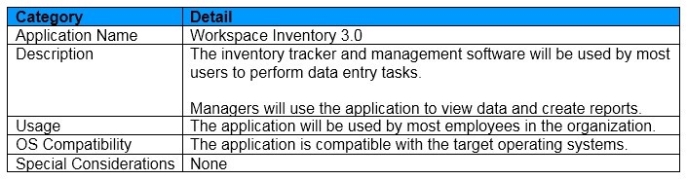
As part of an application analysis performed earlier in the project, the information shown in the exhibit was collected regarding 1 of the required applications.

Click the Exhibit button to view the information.

Additionally, the customer has 3 objectives:

Minimize the amount of additional infrastructure components.

Utilize thin clients as endpoints in order to reduce costs.

Prohibit direct user access to the thin client operating system.

How should the architect install the application?

Select an option, then click Submit answer.

  • Install it directly on a VDA machine image and access it through 2 virtual desktop session.

  • Install it directly on endpoint devices, and include it in a virtual desktop session using the Local App Access feature.

  • Stream it to a VDA machine using Microsoft App-V and access it through a virtual desktop session.

  • Install it on an Application Layer using Citrix App Layering, then present it to assigned users as an Elastic Layer during a virtual desktop.

  • Install it on an Application Layer using Citrix App Layering and include it in a layered image, and access it through a virtual desktop session.