Scenario: A Citrix Architect needs to design a new XenApp and XenDesktop environment.
The architect has identified printing requirements for certain user groups and locations, as shown in the Exhibit.
Click the Exhibit button to view the requirements.
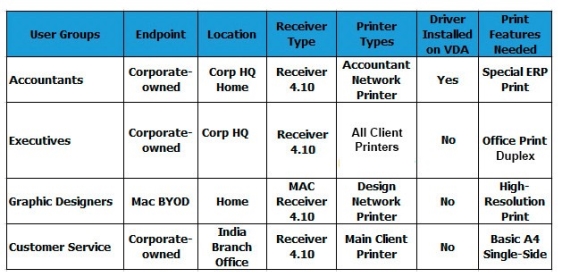
Currently, no printer settings or policies have been configured, and as such, the environment is using default settings. Universal Print Server will NOT be used in this design.
Which two settings should the architect configure to allow the Executives group to achieve the desired print behavior and to ensure their print jobs are optimally routed?
(Choose two.)
Select all that apply, then click Submit answer.
-
○
Set Auto-create Client Printers policy to auto-create local printers only
-
○
Enable Auto-create PDF Universal Printer policy
-
○
Set Direct connections to print servers policy to Enabled
-
○
Set Direct connections to print servers policy to Disabled
-
○
Configure Session Printers policy
-
○
Configure Default Printers policy
-
○
Set Auto-create Client Printers policy to auto-create all client printers
