1Y0-240 Citrix NetScaler 12 Essentials and Traffic Management

Loading demo links...

Showing 4–6 of 10 questions

Question 4

View the Exhibit.
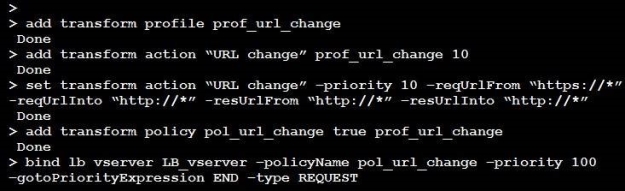
A Citrix Administrator has executed the commands in the screenshot on the Citrix ADC using the command-line interface.

Click on the ‘Exhibit’ button to view the screenshot of the command-line interface.

Which two replacements will be the outcome of executing these commands? (Choose two.)

Select all that apply, then click Submit answer.

  • http:// will be replaced by https:// in the HTTP RESPONSE

  • https:// will be replaced by http:// in the HTTP RESPONSE

  • http:// will be replaced by https:// in the HTTP REQUEST

  • https:// will be replaced by http:// in the HTTP REQUEST

Question 5

What two options are limitations of a typical Global Server Load Balancing (GSLB) setup? (Choose two.)

Select all that apply, then click Submit answer.

  • Apply spillover policies on a subset of GSLB services, and the user CANNOT have a backup for a subset of GSLB services.

  • An administrator CANNOT define a backup for a backup Vserver in an active standby GSLB setup for a given GSLB domain.

  • Restrict the selection of a GSLB service from a subset of GSLB service bound to a GSLB vServer for the given domain.

  • Any given GSLB Vserver can load-balance only one FQDN.

Question 6

Scenario: A Citrix Administrator is troubleshooting a Citrix ADC issue. The administrator goes to the command line and from the Shell, tails the ns.log to view the log in real time to find the issue. After a few minutes, the administrator noticed that the logs stopped scrolling and the issue was missed.

How can troubleshooting continue using the ns.log?

Select an option, then click Submit answer.

  • The ns.log needs to be downloaded to the client machine for full viewing.

  • The ns.log service has stopped and needs to be restarted.

  • The ns.log is still running. Press ‘Enter’ and the ns.log will resume.

  • The ns.log has reached its 100 KB limit. Press ‘CTRL+C’ to stop it from running and issue the command “tail-f ns.log” to resume.