156-915.77 Check Point Certified Security Expert Update

Loading demo links...

Showing 13–15 of 15 questions

Question 13 (Network Address Translation)

Your perimeter Security Gateway’s external IP is 200.200.200.3. Your network diagram shows:
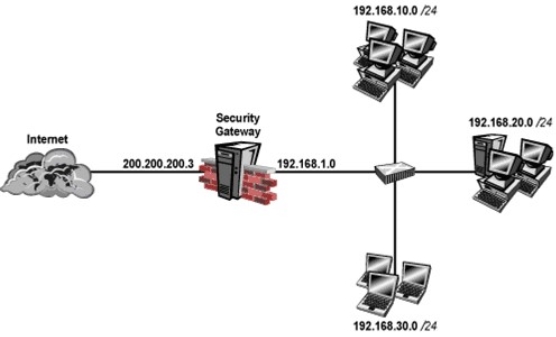
Required: Allow only network 192.168.10.0 and 192.168.20.0 to go out to the Internet, using 200.200.200.5.

The local network 192.168.1.0/24 needs to use 200.200.200.3 to go out to the Internet.

Assuming you enable all the settings in the NAT page of Global Properties, how could you achieve these requirements?

Select an option, then click Submit answer.

  • Create network objects for 192.168.10.0/24 and 192.168.20.0/24. Enable Hide NAT on both network objects, using 200.200.200.5 as hiding IP address. Add an ARP entry for 200.200.200.3 for the MAC address of 200.200.200.5.

  • Create an Address Range object, starting from 192.168.10.1 to 192.168.20.254. Enable
    Hide NAT on the NAT page of the address range object. Enter Hiding IP address 200.200.200.5. Add an ARP entry for 200.200.200.5 for the MAC address of 200.200.200.3.

  • Create a network object 192.168.0.0/16. Enable Hide NAT on the NAT page. Enter 200.200.200.5 as the hiding IP address. Add an ARP entry for 200.200.200.5 for the MAC address of 200.200.200.3.

  • Create two network objects: 192.168.10.0/24 and 192.168.20.0/24. Add the two network objects to a group object. Create a manual NAT rule like the following: Original source group object; Destination - any; Service - any; Translated source - 200.200.200.5;
    Destination - original; Service - original.


Question 14 (Network Address Translation)

You just installed a new Web server in the DMZ that must be reachable from the Internet.

You create a manual Static NAT rule as follows:

Source: Any || Destination: web_public_IP || Service: Any || Translated Source: original ||

Translated Destination: web_private_IP || Service: Original

“web_public_IP” is the node object that represents the new Web server’s public IP address.

“web_private_IP” is the node object that represents the new Web site’s private IP address.

You enable all settings from Global Properties > NAT.

When you try to browse the Web server from the Internet you see the error “page cannot be displayed”. Which of the following is NOT a possible reason?

Select an option, then click Submit answer.

  • There is no Security Policy defined that allows HTTP traffic to the protected Web server.

  • There is no ARP table entry for the protected Web server’s public IP address.

  • There is no route defined on the Security Gateway for the public IP address to the Web server’s private IP address.

  • There is no NAT rule translating the source IP address of packets coming from the protected Web server.


Question 15 (Network Address Translation)

A Web server behind the Security Gateway is set to Automatic Static NAT. Client side NAT is not checked in the Global Properties. A client on the Internet initiates a session to the Web Server. Assuming there is a rule allowing this traffic, what other configuration must be done to allow the traffic to reach the Web server?

Select an option, then click Submit answer.

  • Automatic ARP must be unchecked in the Global Properties.

  • Nothing else must be configured.

  • A static route must be added on the Security Gateway to the internal host.

  • A static route for the NAT IP must be added to the Gateway’s upstream router.