7241X Avaya Equinox™ Solution with Avaya Aura® Collaboration Applications Support Exam

Loading demo links...

Showing 4–6 of 10 questions

Question 4

Which three steps are included in Discipline 3, Develop Interim Containment Actions, of the 8D Troubleshooting Methodology? (Choose three.)

Select all that apply, then click Submit answer.

  • Implement protections

  • Evaluate systems and components

  • Develop immediate controlled actions to isolate the problem

  • Try actions that bypass the issue, like creating a work-around for temporary restoral of service.

  • Develop a hypothesis based on the outcome of the various controlled actions and the system’s reactions.
Question 5

What are the three main components of the Avaya Aura® Multimedia Messaging (AMM) architecture? (Choose three.)

Select all that apply, then click Submit answer.

  • Avaya Equinox Client

  • Avaya Aura® Multimedia Messaging

  • Avaya Aura® Core

  • System Manager

  • Linux Operating System

Question 6

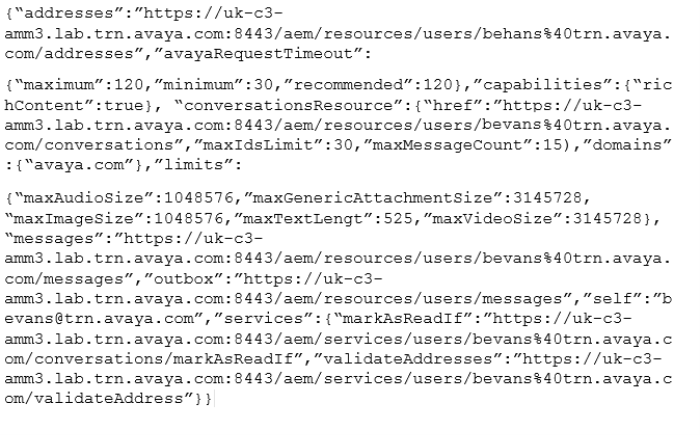
A customer has deployed Avaya Equinox Team Engagement Solution and they want to test the Multimedia feature on their Equinox Clients. The customer uses messaging domain “trn.avaya.com”.

When a user, Bill Evans, tries to send an IM from the Thick Client to John Doe (Web Client) it returns the error message: “Send Failed”. The customer decides to troubleshoot the issue and they get the following AMM configuration parameters when they verify for Bill Evans using https://:8443/aem/resources.

Which reason is a valid reason for the customer problem?

Select an option, then click Submit answer.

  • The customer has configured a wrong AMM Server messaging URL

  • The customer has configured a wrong AMM Server port number “8443”

  • The customer has configured a wrong AMM messaging domain “avaya.com”

  • The customer has configured a correct AMM messaging domain “avaya.com”