9L0-422 OS X Support Essentials 10.10

Loading demo links...

Showing 4–6 of 8 questions

Question 4

How do you start up a Mac in Safe Mode?

Select an option, then click Submit answer.

  • Hold down Command-Option-P-R during startup.

  • Start up from the OS X Recovery partition, then choose Safe Boot from the Startup Disk menu.

  • Hold down Shift during startup.

  • Open Terminal, type shutdown -safe, press Return, then restart the Mac.
Question 5

In a default OS X configuration, you want to configure OS X to delete ZIP files after they're expanded in the Finder. Where can you make that change?

Select an option, then click Submit answer.

  • Finder Preferences

  • System Preferences

  • Disk Utility Preferences

  • Archive Utility Preferences

Question 6

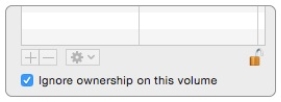
Review the screenshot, then answer the question below.

C:\Users\Chaudhry\Desktop\1.jpg

You connect a Mac OS Extended (Journaled)-formatted FireWire disk to a Mac configured as shown in the screenshot. What will happen the next time a standard user attempts to mount the hard disk?

Select an option, then click Submit answer.

  • The disk will mount, and the user will be able to read, modify, and delete any file on the disk.

  • The disk will mount, and the user will be able to read any file on the disk. The user will be required to enter an administrator password to modify or delete files on the disk.

  • The user will be required to enter an administrator password to mount the disk. After the disk is mounted, the user will be able to read, modify, and delete any file on the disk.

  • The user will be required to enter an administrator password to mount the disk. After the disk is mounted, the user will be able to read any file on the disk but be required to reenter an administrator password to modify or delete files.